Understanding LLM.int8(): Making Large Models Fit
Sun Jun 21 2026
LLM.int8() from First Principles. Most people understand that large language models have billions of parameters, but don’t know exactly how we compress them to run on normal GPUs without destroying their intelligence.
To understand how modern models can fit on consumer hardware, we need to understand Quantization and specifically LLM.int8().
It essentially solved the 8-bit inference bottleneck.
But before we get into the solution, we must understand the core problem.
Step 1: The Memory Gets Too Big
When a model processes text, its intelligence is stored inside billions of weight values.
Historically, most neural networks use FP32 (32-bit floating point). That means every single number occupies 4 bytes of memory.
For a tiny 4-parameter matrix, this is 16 bytes. No problem.
But look at how the memory requirements scale for modern LLMs:
| Model Size | Precision | Memory Required (Weights Only) |
|---|---|---|
| 7 Billion | FP32 | ~28 GB |
| 70 Billion | FP32 | ~280 GB |
Notice: Just the weights of a 70B model require 280 GB of VRAM. Most consumer GPUs cannot even hold a fraction of this memory.
The Rule:
If your model grows, the memory required explodes.
Here is the craziest part: Do we really need 32 bits for every single parameter?
This is exactly the question LLM.int8() asks.
Step 2: The Quantization Question
Instead of storing every weight using 32 bits, we can store them using fewer bits, like INT8 (8 bits).
By moving from FP32 (4 bytes) to INT8 (1 byte), we immediately reduce the memory by 4x. A 280 GB model becomes 70 GB.
But an INT8 value cannot directly store floating-point numbers such as 0.12 or 0.91. INT8 only stores integers from -128 to 127.
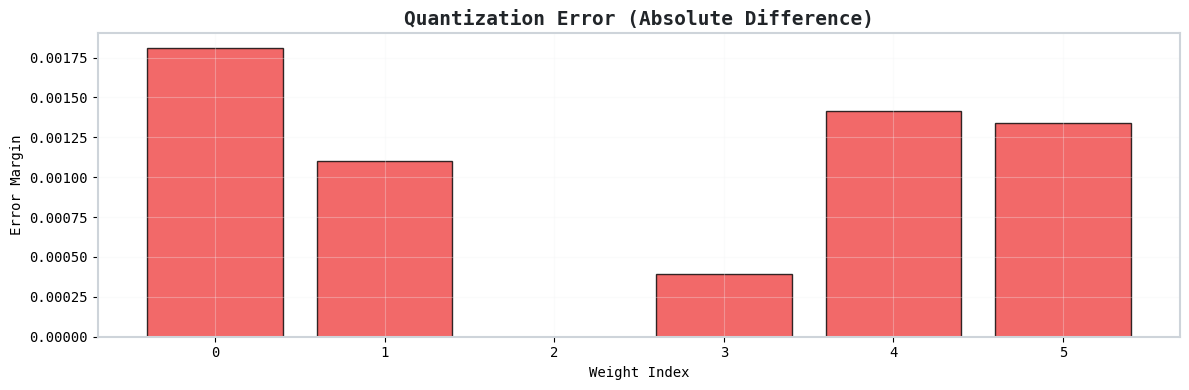
So we store an integer representation and a scaling factor:
0.56 -> 56 with a scale of 0.01.
This is called Naive Quantization.
Step 3: Why Naive Quantization Fails
Until now, quantization looked almost magical. We get 4x less memory with a tiny error. So what’s the catch?
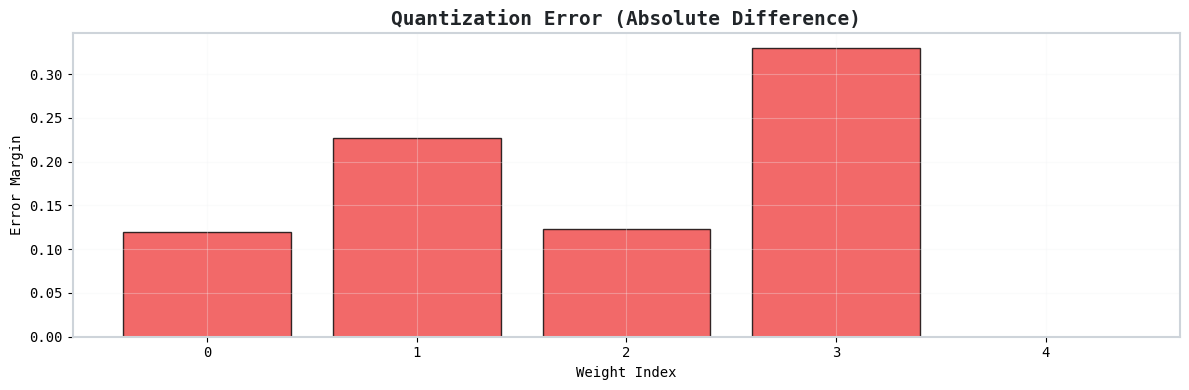
Suppose our weights are [0.12, 0.56, 0.91, 0.33, 100].
Notice the 100. It is an outlier.
Because quantization maps the largest value to the maximum INT8 value (127), the scale becomes 100 / 127 ≈ 0.787.
This single giant value forces a massive scale factor. The smaller values (like 0.12) are completely crushed and lose precision.
The Outlier Problem
In large language models, a tiny fraction of values are orders of magnitude larger than the rest. If we force everything into INT8, these outliers stretch the scale so much that the model loses its intelligence. Researchers tried removing the outliers, but the model quality immediately dropped.
Step 4: The Magic Trick - LLM.int8() Solution
Instead of sending every value through INT8 quantization, LLM.int8() separates the values into two distinct groups:
- Normal Values:
[0.12, 0.56, 0.91, 0.33] - Outlier Values:
[100]
The normal values are processed in INT8. They quantize very well because they live in a similar numerical range.
The outlier values are kept in higher precision (FP16). This avoids introducing large quantization errors.
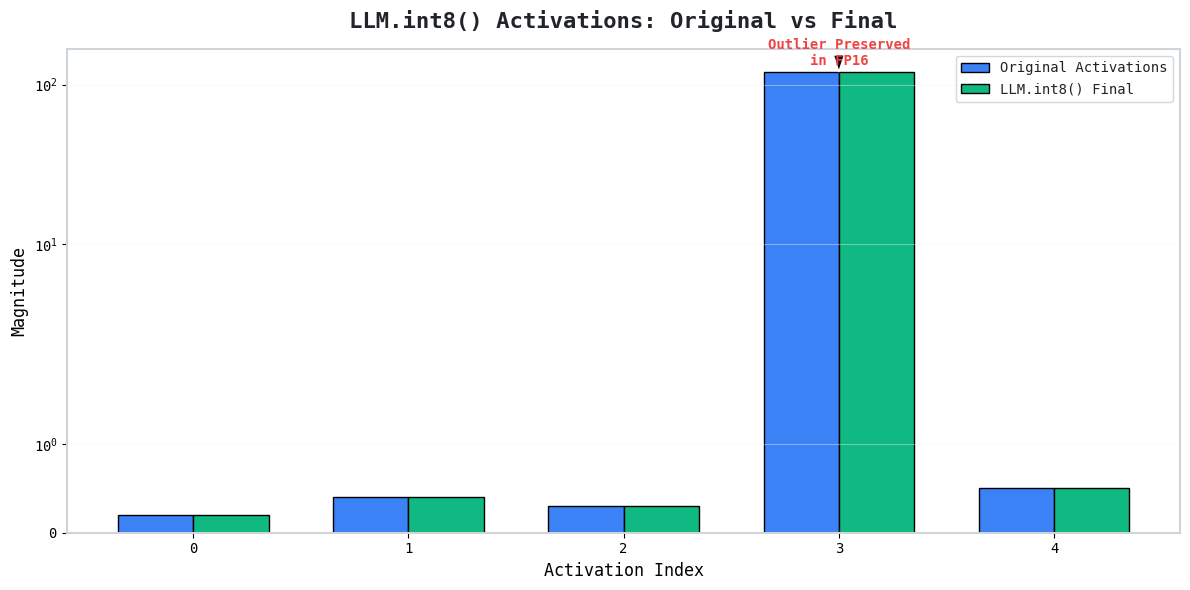
By treating these two groups differently, we never force the normal values to compete with the giant outlier for the quantization scale. We get nearly the memory savings of INT8 with the numerical accuracy of FP16!
Step 5: Split Matrix Multiplication
In practice, Transformers spend their time performing massive matrix multiplications (Activation Vector × Weight Matrix).
LLM.int8() performs two separate, smaller matrix multiplications:
- INT8 Path: Computes the contribution from normal dimensions.
- FP16 Path: Computes the contribution from outlier dimensions.
Once both paths finish, their outputs are perfectly added together.
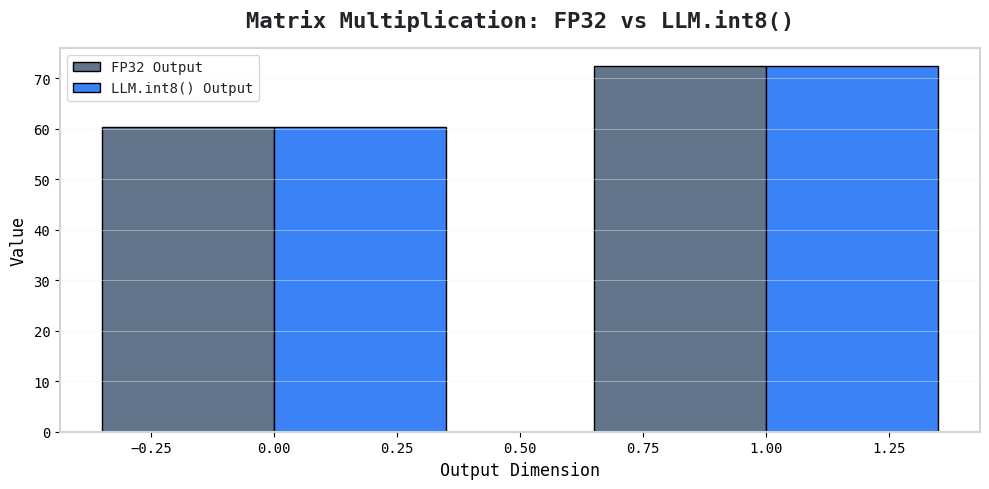
This final output is extremely close to the original FP32 computation while using significantly less memory. Use INT8 wherever possible and keep higher precision only where it is actually needed.
Step 6: The Benchmark Results
When we benchmark the FP32 vs INT8 models for a standard architecture, the results speak for themselves:
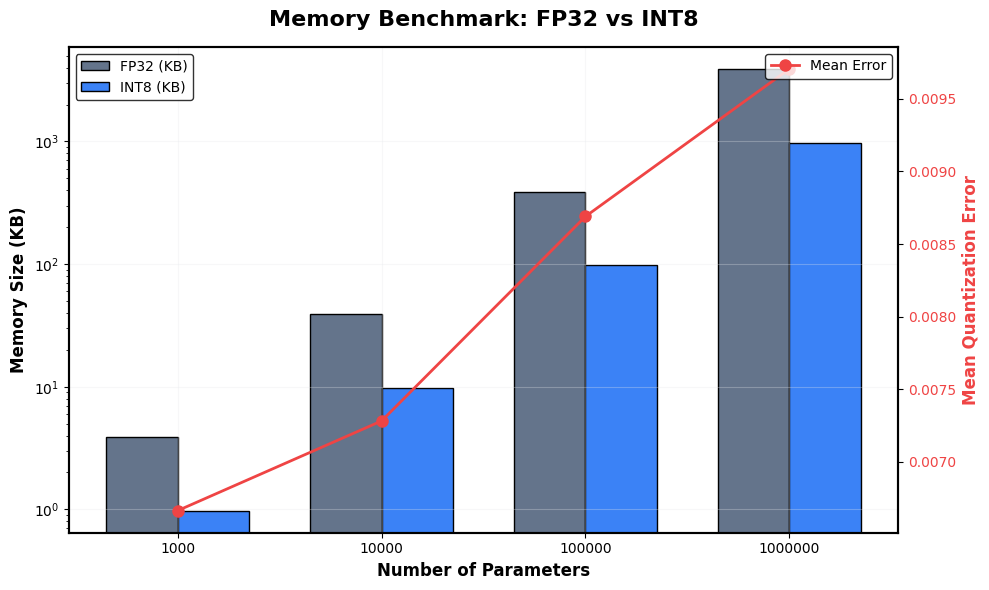
By applying LLM.int8(), we save 75% memory while introducing only a small reconstruction error. When testing generation, the model still understands English, grammar, and context beautifully.
Applying it in Code
Here is how you can use the HuggingFace transformers and bitsandbytes libraries to instantly leverage LLM.int8() for any model:
!pip install transformers
!pip install accelerate
!pip install bitsandbytes
from transformers import AutoModelForCausalLM
from transformers import AutoTokenizer

model_name = "gpt2"

tokenizer = AutoTokenizer.from_pretrained(model_name)

model = AutoModelForCausalLM.from_pretrained(model_name)

print(model)
GPT2LMHeadModel(
  (transformer): GPT2Model(
    (wte): Embedding(50257, 768)
    (wpe): Embedding(1024, 768)
    (drop): Dropout(p=0.1, inplace=False)
    (h): ModuleList(
      (0-11): 12 x GPT2Block(...)
    )
    (ln_f): LayerNorm((768,), eps=1e-05, elementwise_affine=True)
  )
  (lm_head): Linear(in_features=768, out_features=50257, bias=False)
)
Checking Memory
total_params = sum(
    p.numel()
    for p in model.parameters()
)

memory_mb = (
    total_params * 4
) / (1024 * 1024)

print(f"Total Parameters: {total_params:,}")
print(f"Estimated FP32 Memory: {memory_mb:.2f} MB")
Total Parameters: 124,439,808
Estimated FP32 Memory: 474.70 MB
Running Inference
text = "My name is"

inputs = tokenizer(
    text,
    return_tensors="pt"
)

output = model.generate(
    **inputs,
    max_new_tokens=20
)

print(tokenizer.decode(output[0]))
My name is John. I'm a man of God. I'm a man of God. I'm a man
Loading Int8 Version
from transformers import BitsAndBytesConfig

# Creating Configuration
bnb_config = BitsAndBytesConfig(
    load_in_8bit=True
)

# Loading Model
int8_model = AutoModelForCausalLM.from_pretrained(
    model_name,
    quantization_config=bnb_config
)
This line: load_in_8bit=True is literally everything we learned.
Now Comparing Memory
total_params = sum(
    p.numel()
    for p in int8_model.parameters()
)

fp32_memory = (total_params * 4) / (1024 * 1024)
int8_memory = (total_params * 1) / (1024 * 1024)

print(f"FP32 Estimate: {fp32_memory:.2f} MB")
print(f"INT8 Estimate: {int8_memory:.2f} MB")
print(f"Reduction: {fp32_memory/int8_memory:.1f}x")
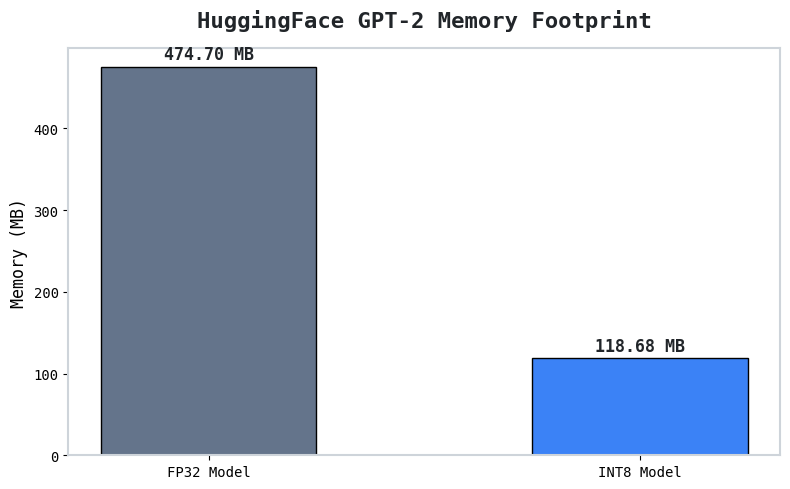
FP32 Estimate: 474.70 MB
INT8 Estimate: 118.68 MB
Reduction: 4.0x
Generating Text Again
output = int8_model.generate(
    **inputs,
    max_new_tokens=20
)

print(tokenizer.decode(output[0]))
My name is John. I'm a writer, and I'm a writer. I'm a writer. I'm
Conclusion at the End:
Before INT8
My name is John. I’m a man of God. I’m a man of God. I’m a man
After INT8
My name is John. I’m a writer, and I’m a writer. I’m a writer. I’m
- Model still understands English
- Model still understands grammar
- Model still understands context
- There is a tiny error at the end, which is what quantization is all about!
import matplotlib.pyplot as plt
import seaborn as sns
import numpy as np

# Plotting the memory comparison
plt.figure(figsize=(8, 5))
models = ['FP32 Model', 'INT8 Model']
memories = [fp32_memory, int8_memory]

plt.bar(models, memories, color=['#64748b', '#3b82f6'], edgecolor='black', width=0.5)
plt.title('HuggingFace GPT-2 Memory Footprint', fontsize=16, fontweight='bold', pad=15)
plt.ylabel('Memory (MB)', fontsize=12)

for i, v in enumerate(memories):
    plt.text(i, v + (max(memories)*0.02), f'{v:.2f} MB', ha='center', fontweight='bold', fontsize=12)

plt.tight_layout()
plt.show()
Comment down your thoughts below, if you found it helpful !
References
LLM.int8(): 8-bit Matrix Multiplication for Transformers at ScaleBest,
Ankit