Understanding SnapKV: Compressing LLM Memory From First Principles
Sun Jun 21 2026
KV Cache is one of the most critical optimization techniques in modern Large Language Models. However, it also creates one of the biggest memory bottlenecks in AI inference.
Most resources explain KV Cache compression with complex math, but the core intuition is surprisingly simple.
In this article, we will break down why KV Cache exists, the massive memory problem it creates, and how a technique called SnapKV solves this by keeping only the tokens that truly matter.
Want visuals? We have plenty of them.
Want intuition first? Keep reading.
Let’s begin.
Step 1: Why Does KV Cache Exist?
Before understanding KV Cache, remember one fundamental rule:
LLMs generate text one token at a time.
If the model is given "My name is" and needs to generate "Ankit", it doesn’t produce the entire answer at once. Instead, it predicts one token, then the next.
The Problem: Repeating The Same Work
Imagine you’re reading a book and someone asks: “What was the first word on page 1?” Every time they ask a new question, you reread the entire book from the beginning. That would be incredibly inefficient.
Without KV Cache, an LLM does exactly this.
"My"
      ↓
   Compute

"My name"
      ↓
Compute Everything Again

"My name is"
      ↓
Compute Everything Again

Generate Next Token
      ↓
Compute Everything Again
The model repeatedly processes the exact same information for previous tokens.
The Solution: KV Cache
Notice something important: The words "My", "name", and "is" never change. Once we’ve processed them, their information remains exactly the same.
KV Cache simply saves the Keys (K) and Values (V) of every previously processed token so they can be reused.
Compute Once → Reuse Forever
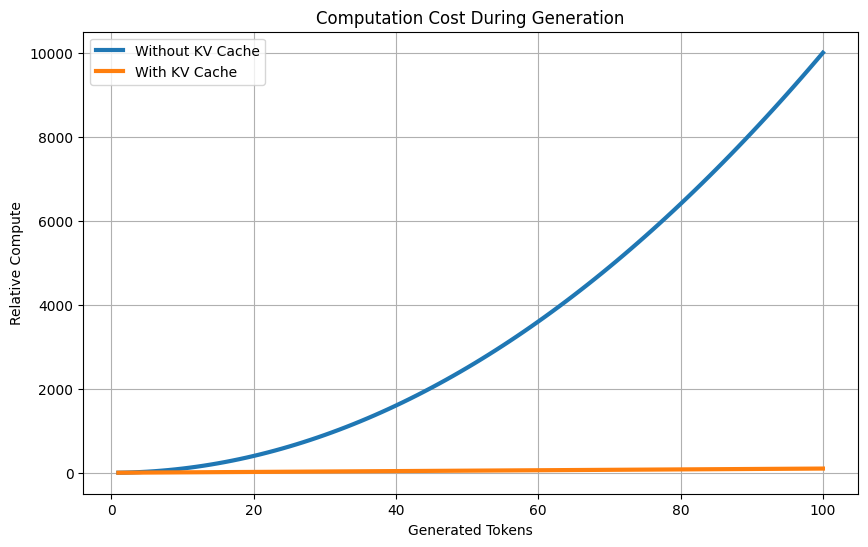
This prevents the model from doing the same attention computations over and over again, drastically speeding up generation.
Step 2: The New Problem Created By KV Cache
While KV Cache makes generation faster, it introduces a massive new problem: Growth of Memory.
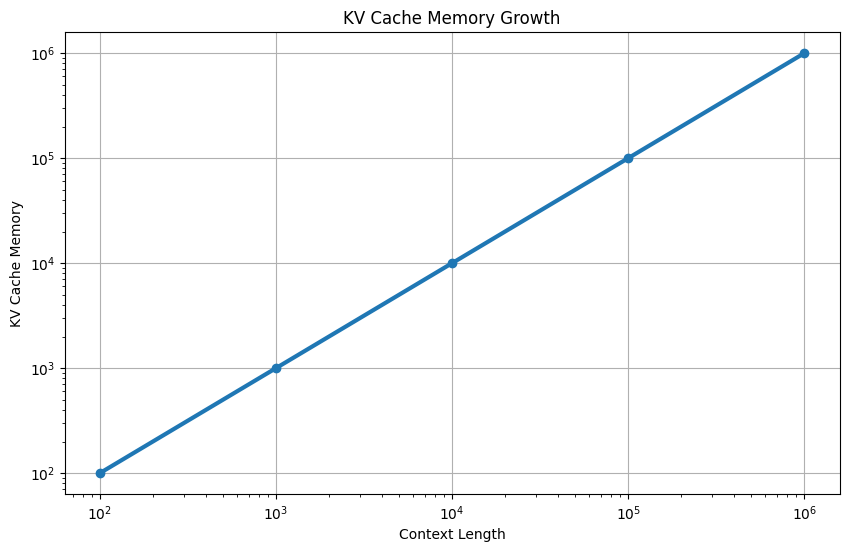
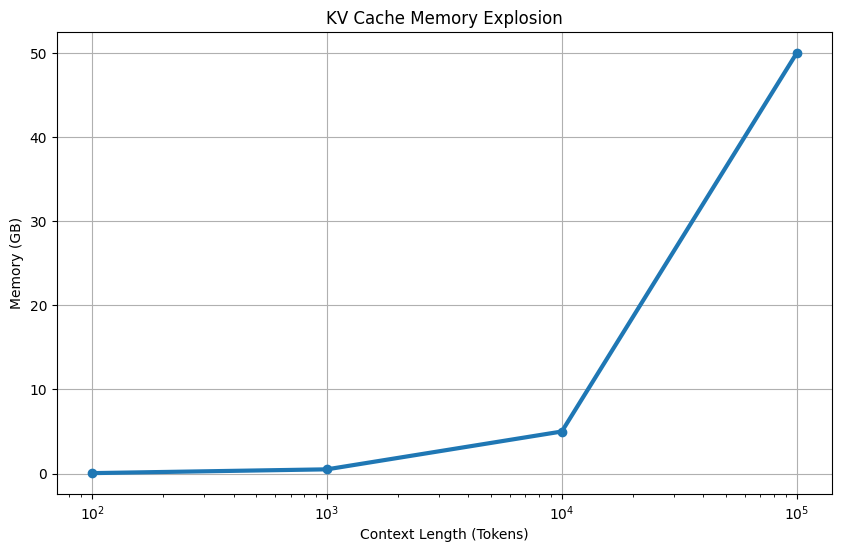
As the conversation gets longer:
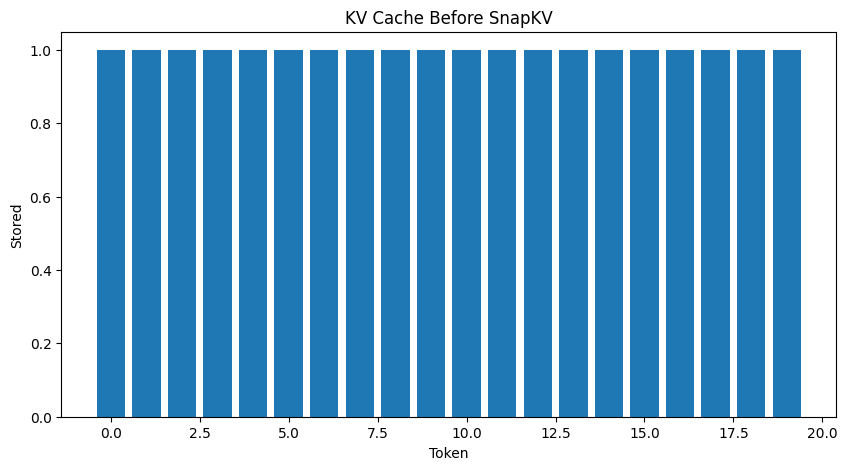
Longer Prompt → More Tokens → More KV Pairs → More Memory
Eventually, the GPU runs out of memory.
The key insight is that KV Cache grows linearly with context length, while model weights stay fixed. Once context windows reached 32k, 128k, and 1M tokens, researchers realized KV Cache was becoming the biggest memory consumer in the inference stack.
Step 3: Do All Tokens Matter Equally?
So far, we know that KV Cache stores every token forever.
But does the model actually care about every token?
Imagine the conversation contains:
My name is Ankit.
I live in Mumbai.
I work in AI.
I love Machine Learning.
If the user asks: "What is my name?"
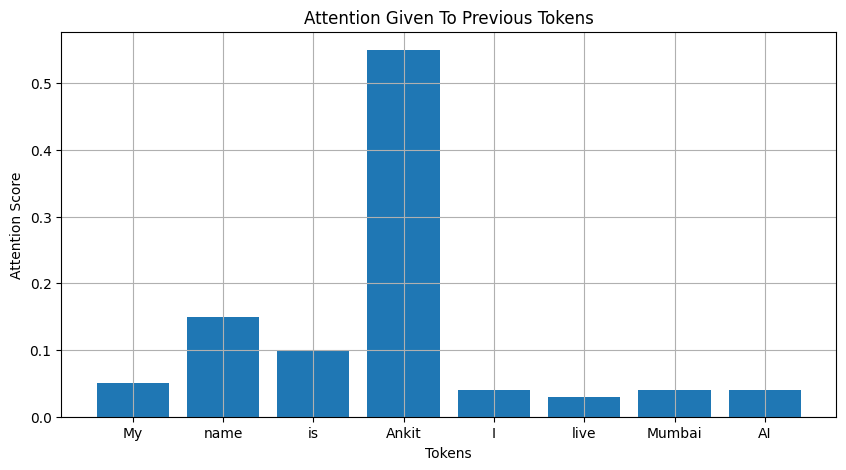
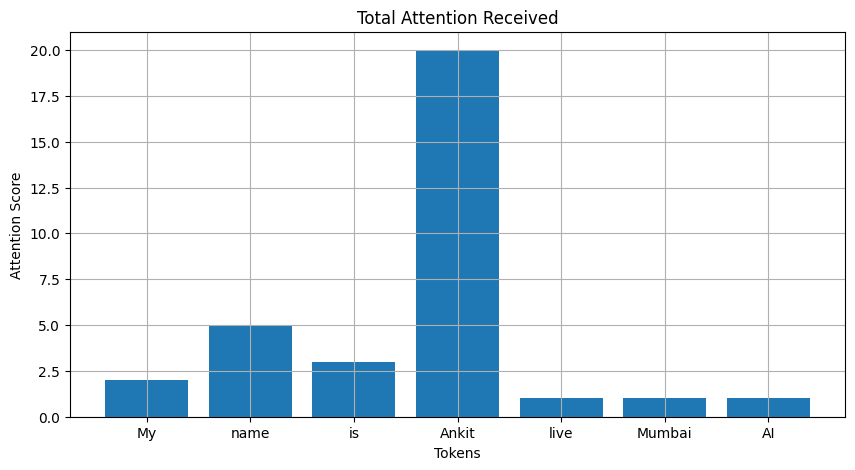
The model mostly cares about the tokens "Ankit" and "name". Tokens like "Mumbai", "AI", and "work" have almost nothing to do with the question.
Think of attention as a spotlight:
My                 ██
name               ███████
is                 ███
Ankit              ███████████████████
I                  █
live               █
Mumbai             █
The Big Observation
Even though the KV Cache contains all tokens, the model only heavily uses a small subset of them.
A token being present in the context does not mean it is equally important for future predictions.
Step 4: How SnapKV Solves the Memory Crisis
SnapKV starts from this surprisingly simple observation:
If a token is almost never attended to, storing its Key and Value forever is wasteful.
Instead of keeping every token, SnapKV asks:
Can we identify which tokens are likely to matter later and discard the rest?
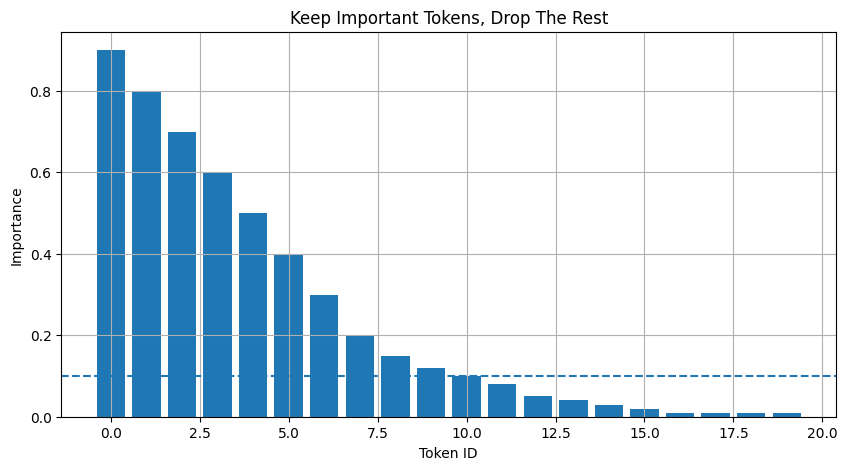
The First-Principles Insight
SnapKV asks a specific question. Not “Which token received attention once?”, but rather:
Which tokens keep receiving attention over and over again?
If future tokens continue to look at the token "Ankit" repeatedly, it means its Key and Value contain vital information. We must keep them!
On the other hand, if a token like "Mumbai" receives almost no attention from any future query, storing it simply wastes KV-cache memory.
Step 5: The SnapKV Algorithm
Think of SnapKV like a library. If you have 1,000 books but students repeatedly borrow only 20 of them, you wouldn’t keep all 1,000 on the front desk. You’d keep the popular ones nearby and move the rest.
Tokens that are repeatedly “checked out” by attention are kept. Tokens that nobody looks at are removed.
The SnapKV process looks like this:
- Observe Attention: Let the model process tokens and see where the attention flows.
- Compute Importance: Track how much total attention each token receives.
- Sort Tokens: Rank them by their importance scores.
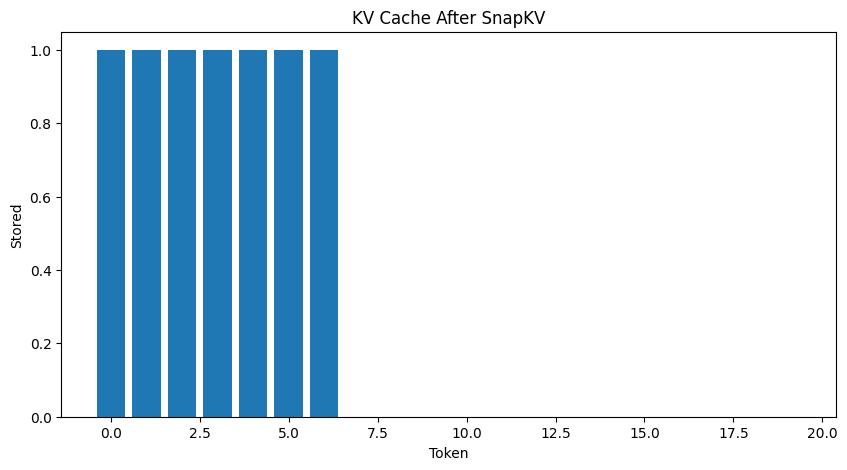
- Keep Top-K Tokens: Retain the most frequently attended KV pairs.
- Delete Remaining: Drop the rest from memory.
Step 6: Pruning and the Visual Proof
When you map out the attention scores visually over a long context, a clear pattern emerges.
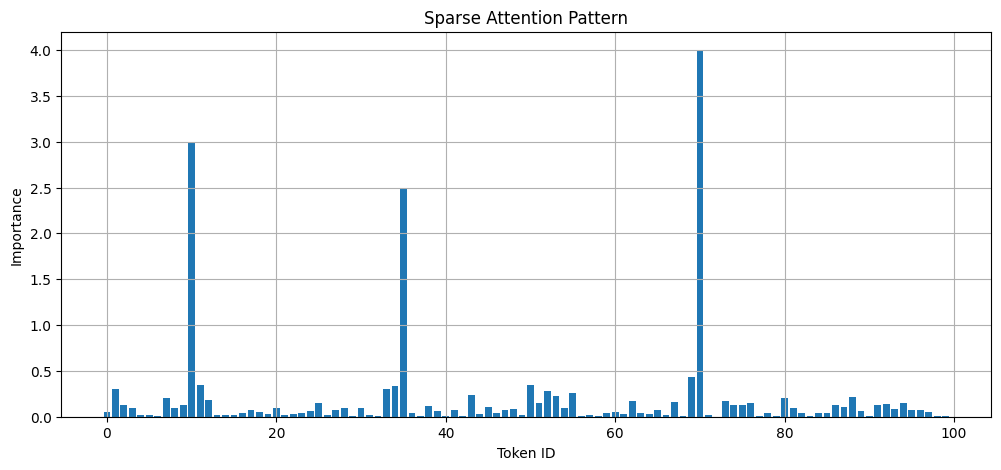
Most tokens show tiny blips of attention. But a few tokens—names, entities, system instructions—create MASSIVE SPIKES. These are the “Important Anchors” that the model constantly refers back to.
By identifying these spikes and deleting the flatline tokens, we can compress the KV Cache significantly.
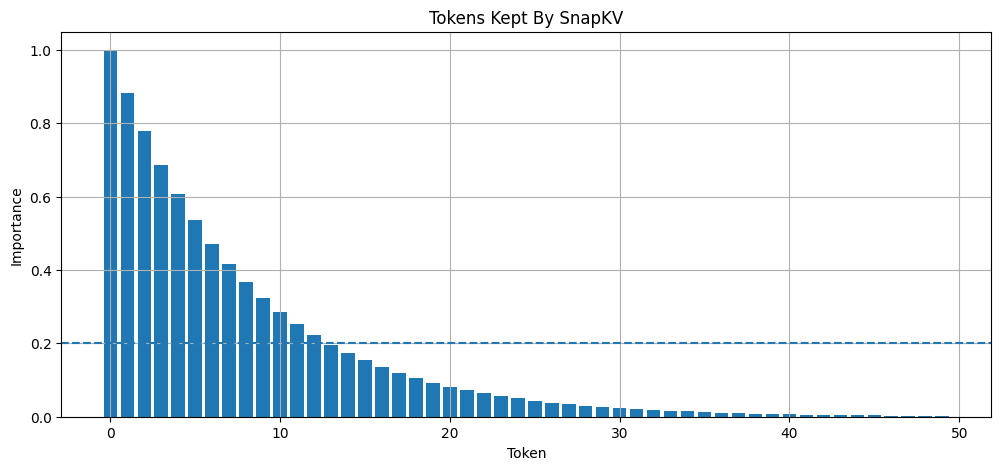
But What if a Deleted Token Becomes Important Later?
Researchers measured this exact scenario. Surprisingly, the Quality Drop is very small, while the memory savings are massive. Because attention repeatedly focuses on those same anchor tokens anyway, dropping the noise barely affects generation quality.
Step 7: Visualizing the Matrix Compression
Let’s look at the actual matrix mechanics of what SnapKV does.
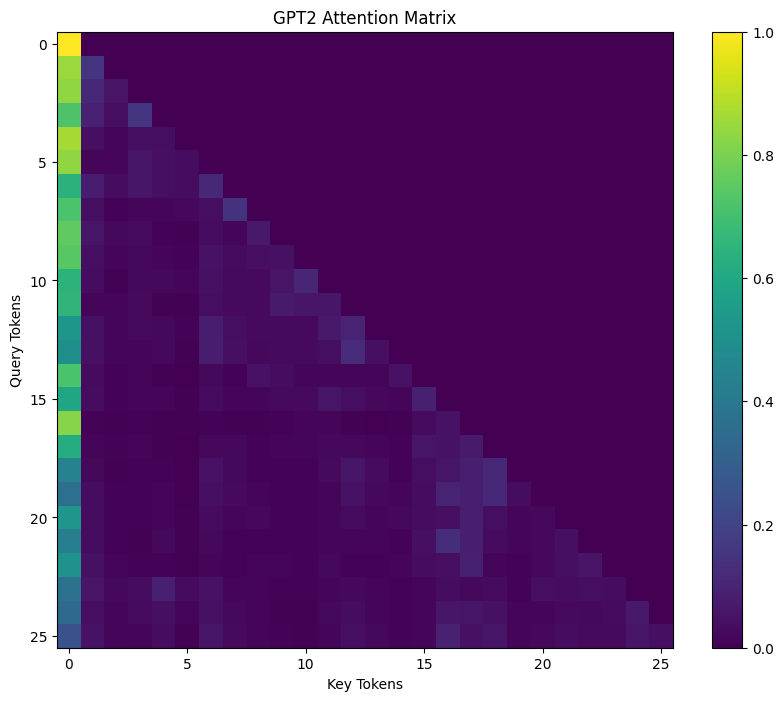
In the raw attention matrix, bright spots represent high attention, and dark areas represent low attention. SnapKV translates this directly into a pruning strategy.
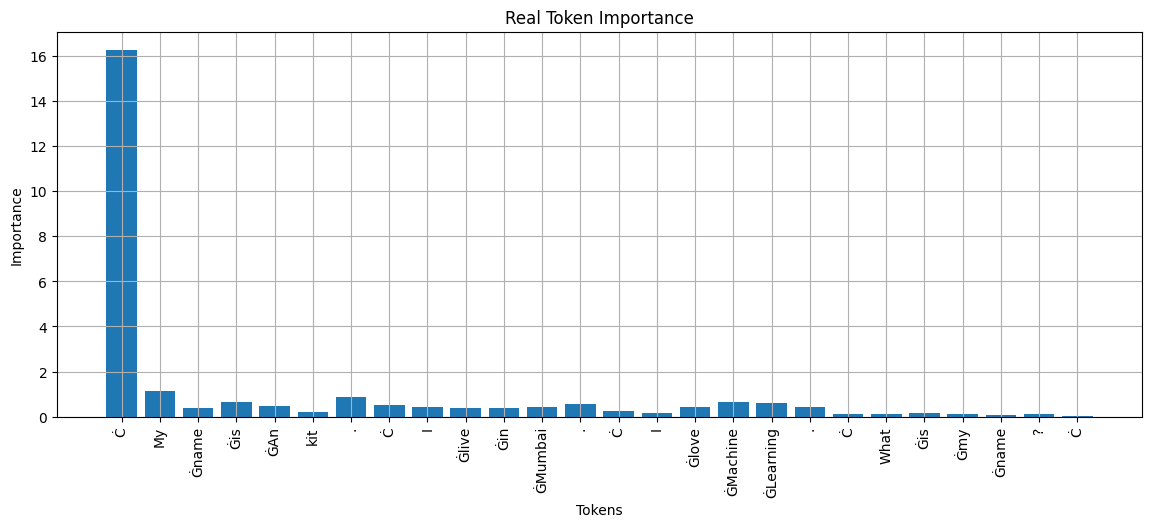
ORIGINAL KV CACHE
K Shape: [1, 12, 26, 64]
V Shape: [1, 12, 26, 64]
COMPRESSED KV CACHE
K Shape: [1, 12, 7, 64]
V Shape: [1, 12, 7, 64]
We’ve reduced the sequence length from 26 tokens to just 7 tokens, keeping only what truly matters.
Mental Model Summary
- Traditional KV Cache: Store the entire textbook.
- SnapKV: Store the summary notes + a few important pages.
It’s not perfect, but it’s drastically smaller and nearly as effective. We simply observed the attention scores, computed importance, kept the Top-K tokens, and pruned the cache.
Comment down your thoughts below, if you found it helpful!
References
SnapKV: LLM Knows What You are Looking for Before GenerationBest,
Ankit